


PATCH 2.0.2.9
New Feature: Group Pings
A new communication system has been introduced to make coordination during group fights faster and easier, without needing to type.How to use Group Pings:
- Hold Alt + Left Mouse Button, move your cursor toward a ping, and release to select it.
- Alternatively, hold Alt + Y to open the ping wheel.
- Individual shortcuts can be assigned under Game Settings → Bindings → Group Pings.
Pings System
Dear players, Something new is coming for our group fighters! We’re working on Pings System, a new way to call the shots without typing a word. Hold Alt + Left Mouse, slide to a symbol and let go. Mark enemies, call for support, regroup your team or warn them about danger. There are five...
 global.wom2.com
Game Settings Improvements
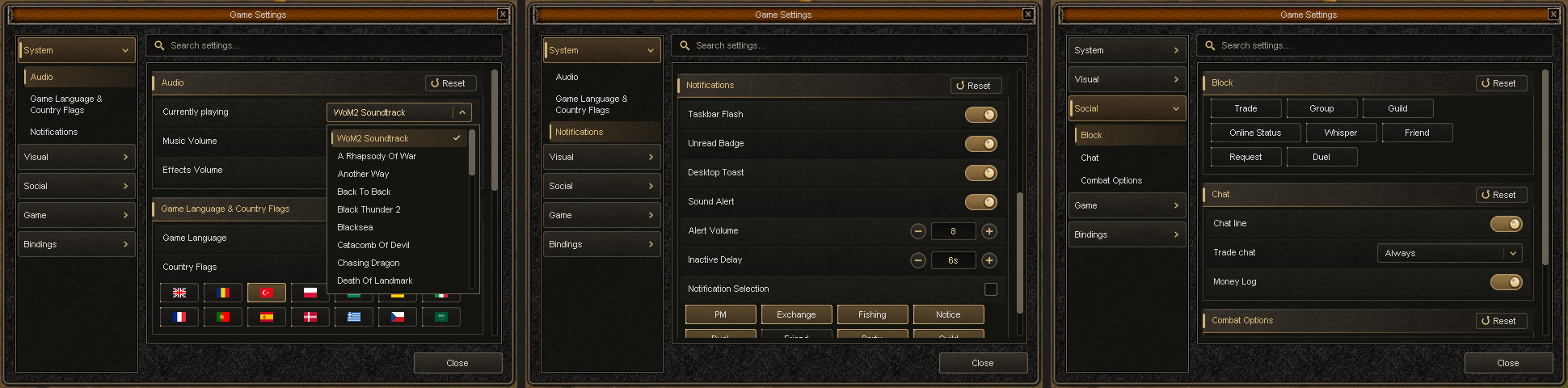
The Game Settings interface has been completely redesigned for improved usability and navigation.
- Introduced a larger, cleaner settings window with redesigned buttons, switches, sliders, and dropdown menus.
- Improved layout and spacing to prevent interface elements from being cut off.
- Added smooth scrolling throughout the settings window.
- Clicking a category in the sidebar now automatically scrolls to its corresponding section.
- Settings can now be changed by clicking anywhere on their respective rows.
- Improved the Search feature with highlighted matching terms and result counts for each category.
- Added a Reset button to each section, allowing players to restore default settings individually.
- Resetting settings preserves your language, resolution, PvP mode, and country flag.
Visual & Interface Improvements
Visible Names- Added new options to customize which names appear on screen.
- Players can independently control the visibility of their own character's name, dropped item names, monsters, bosses, NPCs, and other players.
- These options allow players to reduce on-screen clutter while keeping important information visible.
- Server time and date are now displayed on separate lines for improved readability.
- Updated the date format to make it easier to read.
- Added an option to display FPS on the minimap.
- Added an option to display coordinates on the minimap.
- The Event and Wheel buttons can now be hidden independently.
- These options can be found under Game Settings → Visual → General.
Items & Trading
- The Razador Key obtained from the Random Dungeon Key reward is now tradable.
Bug Fixes & Quality of Life
- Fixed an issue where standing near a portal without meeting its level requirement repeatedly displayed level restriction messages in chat.
- Fixed an issue where using Voice Chat in Always On mode below the required level repeatedly triggered warning messages.
Warm wishes,
WoM2 Team.